
1. Introduction to OCI Firewall Architecture
Oracle Cloud Infrastructure (OCI) provides two software-defined firewall mechanisms to control packet ingress and egress across Virtual Cloud Networks (VCNs): Security Lists and Network Security Groups (NSGs).
Both mechanisms enforce virtual firewall filtering directly at the off-box SmartNIC layer, ensuring zero CPU overhead on compute instances and preventing unauthorized packets from ever touching host hypervisors.
Understanding when to apply Security Lists versus NSGs, and how Stateful vs. Stateless rule mechanics impact traffic connection tables, is critical for building zero-trust cloud architectures.
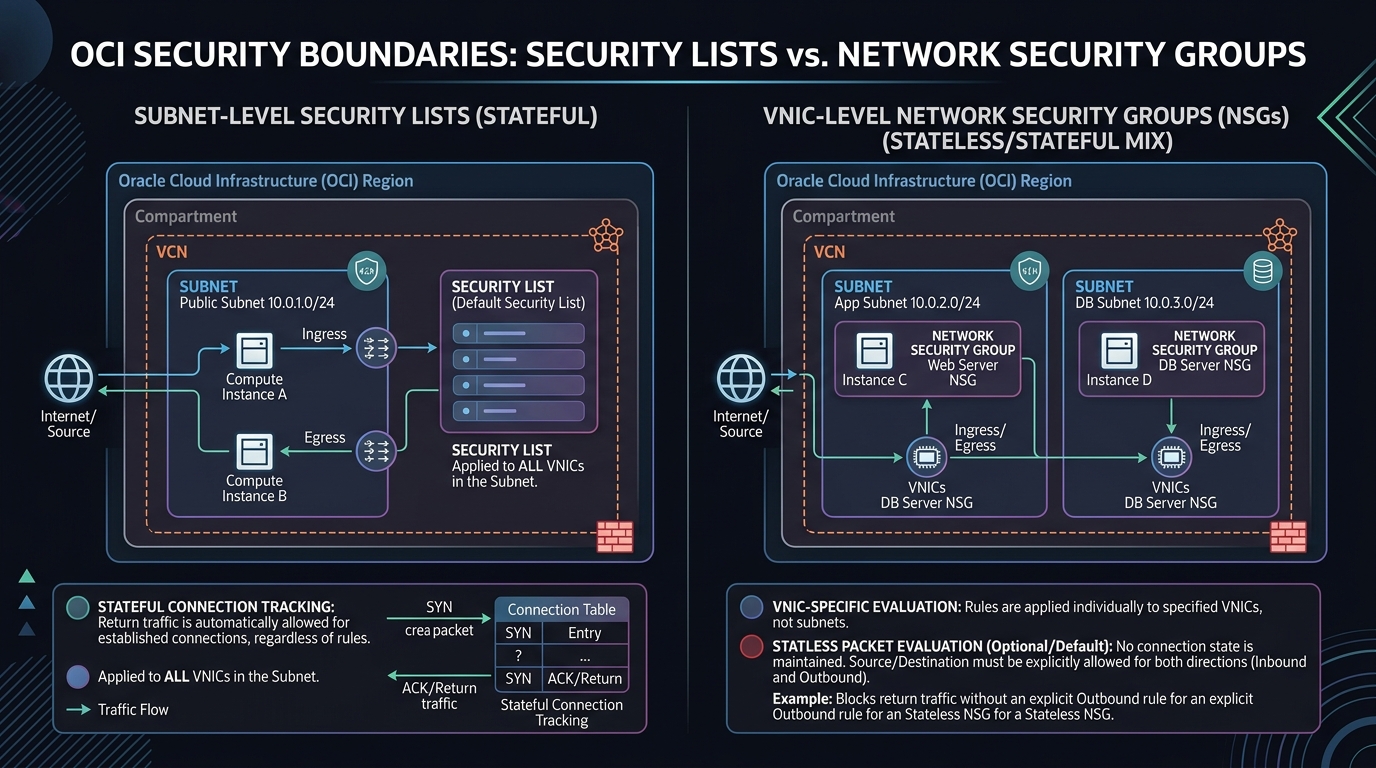
2. Security Lists vs. Network Security Groups (NSGs)
While both Security Lists and NSGs inspect packets using source IP, destination IP, protocol, and port criteria, their scope of enforcement differs fundamentally:
| Feature | Security List | Network Security Group (NSG) |
|---|---|---|
| Enforcement Boundary | Subnet Level. Applies to all VNICs attached to the subnet. | VNIC Level. Applies strictly to VNICs explicitly added to the NSG. |
| Membership Model | Automatic inheritance by all subnets bound to the list. | Explicit assignment per VNIC (up to 5 NSGs per VNIC). |
| Source/Destination Syntax | Requires IP CIDR blocks (e.g., 10.0.1.0/24, 0.0.0.0/0). | Supports IP CIDR blocks OR another NSG OCID as source/destination. |
| Reusability Across VCNs | Bound to a single VCN scope. | Bound to a single VCN, but can reference NSGs across peered VCNs. |
| Architectural Purpose | Coarse-grained network baseline defense per subnet. | Fine-grained, application-centric microsegmentation. |
[!TIP]
OCI Recommended Best Practice
Use Security Lists for broad, subnet-wide baseline rules (e.g., default outbound egress, administrative SSH/RDP jump box access). Use Network Security Groups (NSGs) for granular application tier isolation (e.g., granting App Tier VNICs access to DB Tier VNICs via NSG OCID referencing).
3. Stateful vs. Stateless Security Rules
Every rule defined inside a Security List or NSG must be declared as either Stateful (Default) or Stateless.
1. Stateful Rules (Connection Tracking Enabled)
- Behavior: When an inbound packet matches a stateful ingress rule, OCI creates an internal connection state entry in the SmartNIC connection tracking table (conntrack).
- Return Traffic Handling: Response traffic is automatically allowed back out, regardless of egress security rules.
- Use Case: Web servers (HTTP/HTTPS), SSH management, Database queries, standard API traffic.
2. Stateless Rules (Connection Tracking Bypassed)
- Behavior: Bypasses connection state tracking entirely. Packets are evaluated strictly per-packet in both directions independently.
- Return Traffic Handling: Outbound response traffic is dropped unless an explicit matching egress rule exists covering the client’s ephemeral port range (typically TCP ports
1024-65535or32768-60999). - Use Case: Heavy UDP traffic, high-throughput storage backup streams, Big Data clusters, high-frequency financial trading, or DDoS defense where connection tracking table exhaustion must be avoided.
[!WARNING]
Stateless Return Rule Trap
If you create a stateless ingress rule for port 80/443 without creating a corresponding stateless egress rule for destination ephemeral ports (1024-65535), clients will complete the initial TCP handshake but received HTTP response data will be dropped at the SmartNIC!
4. OCI Web Console (GUI) Step-by-Step Walkthrough
Follow these steps to configure microsegmentation between an Application Tier and a Database Tier using Network Security Groups (NSGs).
Step 1: Navigating to Network Security Groups in the Console
- Open the Navigation Menu (
≡) ➔ Networking ➔ Virtual Cloud Networks. - Select
VCN-Production-Ashburn. - Under Resources on the left panel, click Network Security Groups.
Console Path: [≡ Main Menu] ➔ [Networking] ➔ [Virtual Cloud Networks] ➔ [VCN Details] ➔ [Network Security Groups]
Step 2: Creating NSG for App Tier and DB Tier
- Click Create Network Security Group.
- Name:
NSG-App-Tier➔ Select Compartment ➔ Click Next ➔ Click Create. - Repeat step to create a second NSG:
NSG-DB-Tier.
Step 3: Configuring Fine-Grained NSG Ingress Rules
- Click
NSG-DB-Tierfrom the NSG list. - Under Rules, click + Add Rules.
- Configure the rule to allow Oracle SQL traffic strictly from
NSG-App-Tier: - Direction: Ingress
- Stateless: Unchecked (Stateful)
- Source Type: Network Security Group
- Source NSG: Select
NSG-App-Tier. - IP Protocol: TCP
- Destination Port Range:
1521(Oracle SQL Port) - Click Add Rules.
Step 4: Attaching the NSG to a Compute Instance VNIC
- Navigate to Compute ➔ Instances ➔ Select
DB-Server-01. - Under Attached VNICs, click
Primary VNIC. - Next to Network Security Groups, click Edit.
- Select
NSG-DB-Tierfrom the dropdown menu. - Click Save Changes.
DB-Server-01now accepts port 1521 traffic exclusively from app instances assigned toNSG-App-Tier.
5. Common Architectural Misconceptions & Pitfalls
Misconception 1: “NSGs Replace Security Lists Entirely”
- Reality: NSGs and Security Lists are additive. If a VNIC is in a subnet with a Security List AND assigned an NSG, a packet is permitted if it satisfies EITHER the Security List OR the NSG rules. To enforce strict NSG control, leave Security Lists minimal (or empty).
Misconception 2: “Multiple Security Lists in a Subnet Act as Deny Overrides”
- Reality: OCI firewalls operate on a Permissive-Only Model (Allow List). There are no explicit
DENYrules in OCI Security Lists or NSGs. Traffic not explicitly permitted by at least one active rule is implicitly dropped.
6. OCI Network Security vs. Other Cloud Platforms
| Feature | Oracle Cloud Infrastructure (OCI) | Amazon Web Services (AWS) | Google Cloud Platform (GCP) |
|---|---|---|---|
| Subnet-Level Firewall | Security List (Stateful / Stateless) | Network ACL (NACL) (Stateless only) | Not available (VPC Firewall is instance-based) |
| VNIC-Level Firewall | Network Security Group (NSG) | Security Group (SG) (Stateful only) | VPC Firewall Targets / Service Accounts |
| Explicit Deny Rules | Not supported (Implicit Deny) | Supported in NACLs | Supported in VPC Firewall Rules |
| NSG Source Referencing | Supported (Reference NSG OCID) | Supported (Reference SG ID) | Supported (Reference Service Account / Tags) |
