
1. Introduction to Enterprise Dedicated Connectivity
While IPSec Site-to-Site VPN offers encrypted connectivity over the public internet, enterprise workloads requiring guaranteed low-latency, high-bandwidth predictability, and strict SLA commitments demand direct physical connections.
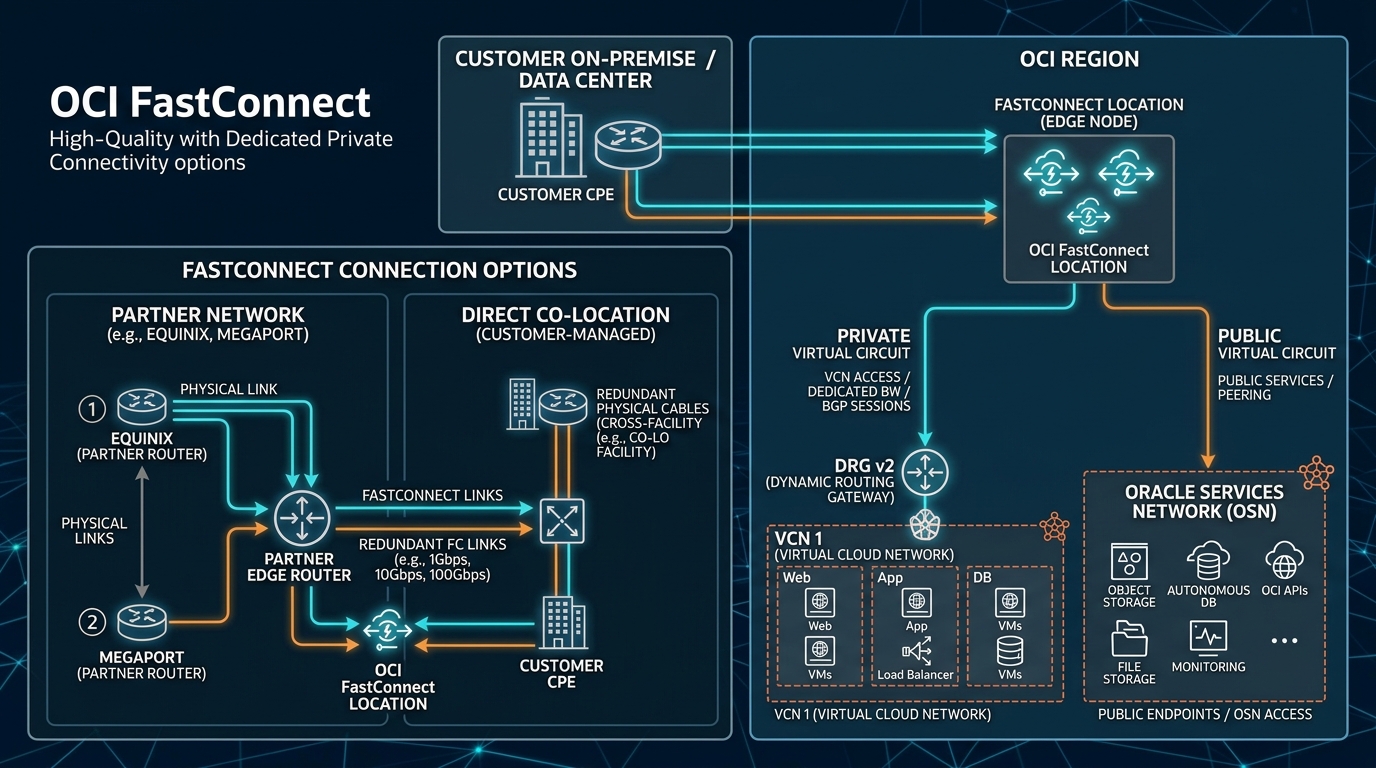
In Oracle Cloud Infrastructure (OCI), dedicated private networking is delivered via OCI FastConnect.
FastConnect provides a dedicated, private, non-proxied network connection bypassing the public internet, linking on-premises data centers directly to OCI VCNs and public services at speeds ranging from 1 Gbps to 100 Gbps.
2. Core Connectivity Models: Partner vs. Direct
OCI FastConnect offers two primary connectivity provisioning models:
1. FastConnect via an OCI Partner (Recommended for Most Enterprises)
- How It Works: Connect to OCI through an established network service provider (e.g., Equinix Fabric, Megaport, AT&T NetBond, Verizon, Megaport).
- Speed Flexibility: Provision virtual circuit bandwidth incrementally from 100 Mbps up to 10 Gbps.
- Lead Time: Rapid provisioning (often under 1 hour) via automated cloud partner portals.
2. FastConnect Direct Co-location
- How It Works: Establish a direct physical fiber patch cable (cross-connect) between your router and Oracle’s FastConnect router inside an OCI Point of Presence (POP) data center (e.g., Equinix Ashburn, Digital Realty Frankfurt).
- Port Speeds: Dedicated 10 Gbps or 100 Gbps physical ports.
- Lead Time: Requires physical cross-connect ordering and Letter of Authorization / Connecting Facility Assignment (LOA/CFA) optical patch installation.
3. Virtual Circuits: Private vs. Public
Once the physical port or partner link is established, you provision Virtual Circuits (802.1Q VLAN tags) to direct traffic:
| Virtual Circuit Type | Network Target | BGP Peering Target | Architectural Purpose |
|---|---|---|---|
| Private Virtual Circuit | Connects directly to a Dynamic Routing Gateway (DRG v2). | Private BGP session between CPE and DRG. | Grants access to private VCN subnets, databases, compute instances, and internal load balancers. |
| Public Virtual Circuit | Connects to the Oracle Services Network (OSN). | Public BGP session with Oracle edge routers. | Grants access to public OCI PaaS services (Object Storage, Public API endpoints) over private fiber without touching public ISPs. |
4. BGP Dynamic Routing & High Availability Architecture
FastConnect requires BGP (Border Gateway Protocol) for route propagation:
- Autonomous System Numbers (ASN):
- On-Premises ASN: Private ASN (e.g.,
65000–65534) or Public ASN. - OCI FastConnect BGP ASN: Oracle’s default ASN is
31898(customizable inside DRG v2). - Active-Active Redundancy: For production enterprise SLAs (99.99%), deploy two FastConnect circuits terminating on separate OCI FastConnect edge routers across distinct physical POPs.
5. OCI Web Console (GUI) Step-by-Step Walkthrough
Follow these steps to provision a Private Virtual Circuit via an OCI FastConnect Partner (e.g., Equinix Fabric).
Step 1: Initiating FastConnect in the OCI Console
- Open Navigation Menu (
≡) ➔ Networking ➔ FastConnect. - Select your compartment (
Network-Compartment). - Click Create FastConnect Connection.
Console Path: [≡ Main Menu] ➔ [Networking] ➔ [FastConnect]
Step 2: Selecting Connection Type & Provider
- Select FastConnect Partner ➔ Choose your provider from the list (e.g.,
Equinix Fabric). - Click Next.
- Configure Connection Details:
- Name:
FC-Private-Equinix-Ashburn - Compartment:
Network-Compartment - Virtual Circuit Type: Select Private Virtual Circuit.
- Dynamic Routing Gateway: Select
DRG-Hub-Ashburn. - Provisioned Bandwidth: Select
1 Gbps. - Customer BGP ASN:
65000 - Configure BGP Network Details:
- Customer BGP IPv4:
10.254.0.1/30 - Oracle BGP IPv4:
10.254.0.2/30 - Click Create.
Step 3: Completing Partner Portal Provisioning
- On the FastConnect details page, copy the autogenerated Service Key (OCI Provider Service Key / OCID).
- Log in to your Equinix Fabric Portal (or Partner Portal).
- Create a new Virtual Connection ➔ Select Oracle Cloud Infrastructure ➔ Paste the OCI Service Key.
- Select matching bandwidth (
1 Gbps) and submit order. - In the OCI Console, the FastConnect status transitions to Provisioned, and the BGP session status changes to Up.
6. Common Architectural Misconceptions & Pitfalls
Misconception 1: “FastConnect Traffic is Automatically Encrypted”
- Reality: FastConnect provides private physical isolation, but packets flowing across FastConnect virtual circuits are unencrypted by default. If regulatory compliance requires encryption in transit over dedicated circuits, you must run an IPSec VPN tunnel on top of the Private Virtual Circuit (IPSec over FastConnect).
Misconception 2: “Public Virtual Circuits Grant Access to Private Subnets”
- Reality: Public Virtual Circuits strictly advertise Oracle’s public IP ranges (OSN). They cannot route packets to private VCN subnets. To reach private subnets, you must provision a Private Virtual Circuit attached to a DRG v2.
7. OCI FastConnect vs. Other Cloud Platforms
| Feature | Oracle Cloud Infrastructure (OCI) | Amazon Web Services (AWS) | Google Cloud Platform (GCP) |
|---|---|---|---|
| Dedicated Direct Connect Service | OCI FastConnect | AWS Direct Connect (DX) | Cloud Interconnect |
| Speed Increments | 100 Mbps to 100 Gbps | 50 Mbps to 100 Gbps | 50 Mbps to 100 Gbps |
| Inbound Data Transfer Fee | FREE | FREE | FREE |
| Outbound Data Transfer Fee | FREE (First 10 TB/mo free; heavily discounted globally) | Charged per GB egress | Charged per GB egress |
