
1. Introduction to Layer 7 Load Balancing
Modern web applications demand intelligent traffic management, high availability across Availability Domains, SSL/TLS security offloading, and dynamic auto-scaling.
Oracle Cloud Infrastructure (OCI) delivers Layer 7 application load balancing via the Flexible Load Balancer (L7).
The OCI Flexible Load Balancer operates at Layer 7 (Application Layer) of the OSI model. It inspects HTTP/HTTPS header details, request paths, hostnames, and cookies to route traffic intelligently across backend compute pools, container clusters, or bare metal web servers.
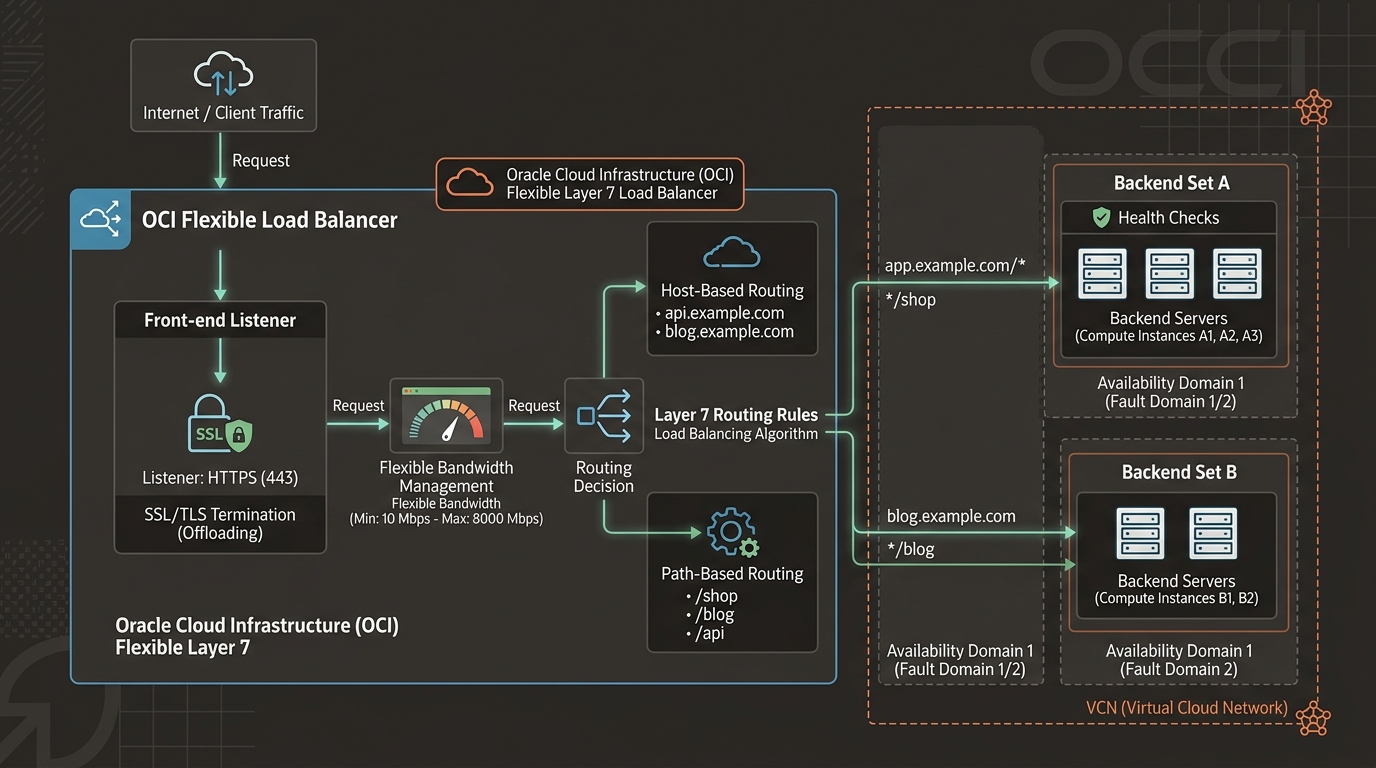
2. Core Architectural Features of OCI L7 Load Balancer
1. Flexible Bandwidth Scaling
Unlike legacy load balancers that required static shape selection (e.g., 100 Mbps fixed shape), the OCI L7 Load Balancer uses Flexible Bandwidth:
* Minimum Bandwidth: Baseline guaranteed throughput (e.g., 10 Mbps).
* Maximum Bandwidth: Upper limit ceiling (up to 8,000 Mbps / 8 Gbps).
* The OCI control plane scales underlying load balancer compute nodes dynamically between minimum and maximum limits without connection drops or manual intervention.
2. High Availability Pair Deployment
When you provision a Public Load Balancer, OCI automatically deploys an Active-Active pair of load balancer instances placed in separate Availability Domains (or separate Fault Domains in single-AD regions).
- Single Virtual IP (VIP): Both active nodes share the same Public Reserved IP address. If an AD experiences an outage, traffic shifts seamlessly to the surviving node.
3. Layer 7 Routing Mechanics
The L7 Load Balancer processes traffic using 4 core building blocks:
Incoming HTTPS Request ➔ [Listener] ➔ [Host/Path Request Route Set] ➔ [Backend Set] ➔ [Backend Server]
- Listeners: Defines incoming protocol (HTTP, HTTPS, TCP), port (e.g.,
80,443), and assigned SSL/TLS certificates. - Request Route Sets: Rules evaluating HTTP request attributes:
- Host-Based Routing: Route
api.company.comto API Backend Set; routeapp.company.comto Main Web Backend Set. - Path-Based Routing: Route
/images/*or/downloads/*to specialized storage servers. - Backend Sets: Logical grouping of application servers with shared health check configurations, load balancing policies, and SSL settings.
- Health Check Policies: Probes backend servers (HTTP GET, TCP ping) to isolate unhealthy instances automatically.
3. SSL/TLS Termination & Re-Encryption Patterns
The OCI Load Balancer supports 3 distinct SSL encryption workflows:
1. SSL Termination (Offloading – Most Common): SSL handshake is decrypted at the load balancer. Traffic sent from load balancer to backend servers flows over unencrypted HTTP (Port 80) inside the private VCN. Offloads CPU-intensive RSA/ECC cryptographic processing from web VMs.
2. End-to-End SSL (Re-Encryption): Load balancer decrypts incoming HTTPS traffic for Layer 7 inspection/routing, then re-encrypts packets before sending them over HTTPS to backends. Required for strict PCI-DSS / HIPAA compliance.
3. SSL Pass-Through: Handled at Layer 4 (Network Load Balancer). Encrypted packets bypass load balancer inspection entirely and terminate directly on backend servers.
4. OCI Web Console (GUI) Step-by-Step Walkthrough
Follow these operational steps to provision a Public Flexible Load Balancer with HTTPS SSL Termination.
Step 1: Navigating to Load Balancers in the Console
- Open Navigation Menu (
≡) ➔ Networking ➔ Load Balancers. - Select your compartment (
Network-Compartment). - Click Create Load Balancer.
Console Path: [≡ Main Menu] ➔ [Networking] ➔ [Load Balancers]
Step 2: Provisioning the Flexible Load Balancer
- Select Load Balancer (HTTP/HTTPS) ➔ Click Create Load Balancer.
- Configure Basic Details:
- Name:
LB-Public-Production - Visibility: Select Public.
- Assign Public IP: Select Reserved Public IP (
VIP-Production). - Flexible Bandwidth: Min:
10 Mbps| Max:1000 Mbps. - Choose Network:
- VCN:
VCN-Production-Ashburn - Subnet: Select
Subnet-Public-Regional. - Click Next.
Step 3: Configuring Backend Set and Health Check
- Backend Set Name:
BES-App-Tier - Load Balancing Policy: Select Weighted Round Robin (or Least Connections / IP Hash).
- Health Check Policy:
- Protocol:
HTTP - Port:
80 - URL Path:
/healthz - Interval:
10 seconds - Click Add Backends ➔ Select compute instances (
VM-App-01andVM-App-02) ➔ Port80. - Click Next.
Step 4: Configuring Listener with SSL Certificate
- Listener Name:
Listener-HTTPS-443 - Protocol:
HTTPS| Port:443 - Under Certificate Management:
- Select OCI Certificate Service (or upload custom SSL certificate, private key, and CA bundle).
- Choose certificate:
cert-production-example-com. - Select Backend Set:
BES-App-Tier. - Click Submit. OCI provisions the dual-node load balancer cluster in under 2 minutes.
5. Common Architectural Misconceptions & Pitfalls
Misconception 1: “Load Balancer Health Checks Ignore Security Lists”
- Reality: OCI Load Balancer health checks execute via private IP addresses from the load balancer’s subnet. If your backend compute instance Security List or NSG drops incoming TCP/HTTP health check probes from the load balancer subnet CIDR, the load balancer will mark backends as Unhealthy and drop incoming web traffic.
Misconception 2: “Cookie-Based Session Persistence Works When App Servers Modify Cookies”
- Reality: OCI L7 Load Balancer supports Server-Consistent Cookie and Load Balancer-Inserted Cookie persistence. If using Load Balancer-Inserted Cookies, the load balancer injects its own HTTP cookie header. Applications must not overwrite or strip this cookie header.
6. OCI L7 Load Balancer vs. Other Cloud Platforms
| Feature | Oracle Cloud Infrastructure (OCI) | Amazon Web Services (AWS) | Google Cloud Platform (GCP) |
|---|---|---|---|
| Layer 7 Load Balancer | Flexible Load Balancer (L7) | Application Load Balancer (ALB) | Global External HTTP(S) Load Balancer |
| Bandwidth Model | Flexible (Min/Max shape configuration) | Auto-scaling LCU model | Auto-scaling capacity units |
| Public IP Binding | Single Reserved Public IP across ADs | Dual Elastic IPs across AZs | Single Anycast Global IPv4 |
| Max Flexible Throughput | Up to 8,000 Mbps (8 Gbps) per LB | Dynamic AWS scaling | Dynamic GCP scaling |
| Health Check Protocols | HTTP, HTTPS, TCP | HTTP, HTTPS, gRPC | HTTP, HTTPS, HTTP/2, TCP |
